Daemon and runtimes
Agents don't run on Concierto's servers, they run on your own machines.
In Concierto, agents never run inside the coordination server. They run on a runtime, and there are two models. With the local daemon, a small program on your own machine invokes the AI coding tools installed locally. With the cloud (hosted) runtime, Concierto Cloud's managed worker pool runs the work for you, so no local machine is needed. Either way, the Concierto server only coordinates: it stores issues, queues tasks, and dispatches them to the right runtime.
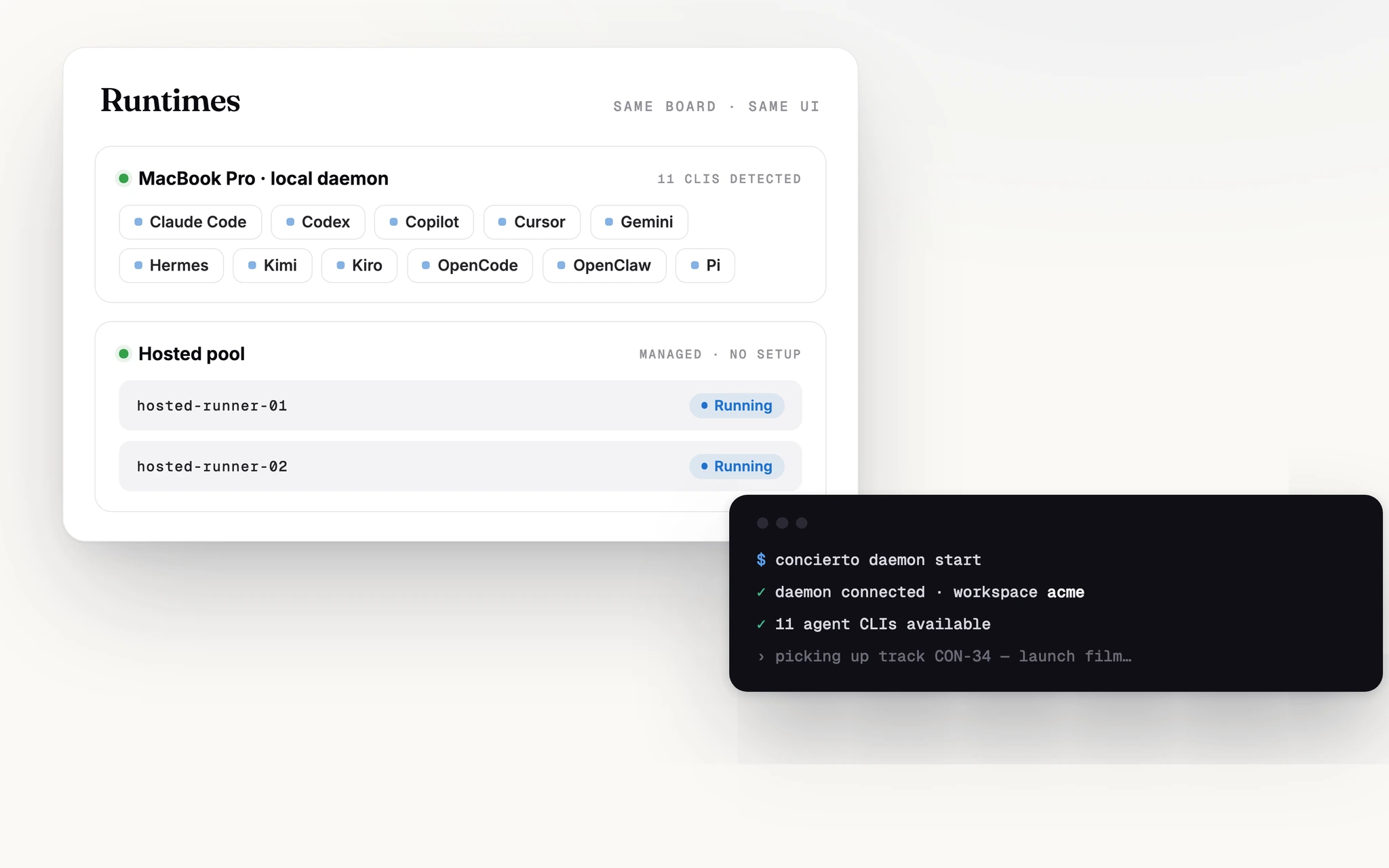
With the local daemon, your API keys, toolchain, and code directories stay on your machine and the Concierto server never sees any of them. That means "my agent isn't working" on the local model is almost always a local problem. The daemon isn't running, an AI tool isn't installed, a key has expired. Check locally first; see Troubleshooting for a guide. The hosted runtime runs on Concierto Cloud instead and is covered in Cloud (hosted) runtimes below.
Starting the daemon
The daemon is part of the Concierto CLI. Once you've installed the Concierto CLI, run on your own machine:
concierto daemon startOn startup it does four things:
- Reads the credentials saved when you logged in
- Detects AI coding tools installed on your
PATH(11 built-in: Claude Code, Codex, Cursor, Copilot, Gemini, Hermes, Kimi, Kiro CLI, OpenCode, OpenClaw, Pi) - Registers itself with the server, along with a runtime for each detected tool
- Keeps polling every 3 seconds for tasks to pick up, and sends a heartbeat every 15 seconds
Common commands:
| Command | Purpose |
|---|---|
concierto daemon start | Start (background by default; add --foreground to run in the foreground) |
concierto daemon stop | Stop |
concierto daemon restart | Restart |
concierto daemon status | Show status |
concierto daemon logs | Show logs (add -f to follow) |
Full CLI reference in CLI commands.
The desktop app ships with a daemon. If you use the desktop app, you don't need to run concierto daemon start manually, it launches the daemon automatically on startup. See the Desktop app page for which option fits your workflow.
Why one machine has multiple runtimes
A runtime is not a server and not a container, it's the combination of "daemon × one AI coding tool". For example: you start the daemon on a MacBook with both Claude Code and Codex installed, and you're a member of two workspaces. Concierto then registers 4 runtimes:
Key points:
- One daemon can map to multiple runtimes, one per combination of installed tool and workspace you belong to
- The same daemon, workspace, and tool produces exactly one runtime, restarting the daemon never creates duplicate records
- The Runtimes page in the Concierto UI lists these rows
Cloud (hosted) runtimes
There is a second runtime model that needs no local daemon at all: the hosted runtime. Agent tasks run on Concierto Cloud's managed worker pool (the daemon pool), and the workspace gets a Concierto Hosted runtime provisioned automatically.
How it behaves:
- No machine to keep running. The pool claims and executes tasks for you. You can create agents and assign work even with no local daemon online.
- Provisioned automatically. When hosted execution is on for your workspace, Concierto creates the Concierto Hosted runtime and points the workspace's default at it. While the pool is still connecting, the runtime shows Starting; once a worker registers, it flips to online and tasks dispatch.
- Metered as credits. Model usage on the hosted runtime draws down your plan's model credits. See Plans and billing for how credits work.
The hosted runtime is the engine behind Concierto Pro. It is generally available on Concierto Cloud, where it is provisioned automatically for Pro workspaces. Self-hosted deployments enable it by setting HOSTED_RUNTIME_ENABLED on the backend (with an optional workspace allowlist for staged rollout).
When a runtime is marked offline
Concierto uses heartbeats to decide whether a runtime is online. Three key numbers:
| Event | Threshold |
|---|---|
| Daemon heartbeat frequency | Every 15 seconds |
| Marked as missing | No heartbeat for 45 seconds (3 missed beats) |
| Auto-deleted | Missing with no associated agents for over 7 days |
Missing is not permanent. As soon as the daemon sends another heartbeat it returns to online, and the runtime record is preserved. Restarting the daemon does not lose runtimes.
Tasks running on a missing runtime are marked as failed (failure reason runtime_offline). For retryable sources (issues, chat), Concierto automatically requeues them; Autopilot-triggered tasks are not retried automatically. See Tasks → Which failures retry automatically.
How many tasks can run in parallel
Concierto enforces concurrency limits at two layers:
- Daemon layer: 20 concurrent tasks by default (tunable via env var
CONCIERTO_DAEMON_MAX_CONCURRENT_TASKS) - Agent layer: 6 concurrent tasks per agent by default (configured per-agent)
The tighter of the two wins. If your daemon is already running 20 tasks, new tasks wait even if an agent still has headroom.
If you see tasks stuck in queued without moving to dispatched, one of these two limits is usually saturated.
What happens to in-flight tasks after a daemon crash
When the daemon crashes or is force-killed, the tasks it had picked up are left in dispatched or running. On the next start, the daemon tells the server: "these tasks are no longer mine, please mark them failed." The server flips them to failed with reason runtime_recovery. For retryable sources, the tasks are automatically requeued.
Even if this step fails due to a network issue, there's a server-side scan every 30 seconds as a backstop: any runtime without a heartbeat for over 45 seconds is marked missing, and its tasks are reclaimed along with it.
Troubleshooting agents that aren't working
When you hit a "my agent isn't working" problem, run this three-step checklist first:
- Run
concierto daemon status, confirm the daemon is running and online - Run
concierto daemon logs -f, check for errors - Open the Runtimes page in the Concierto UI, confirm your runtime shows "online"
More scenarios in Troubleshooting.
Next
- Tasks, the full lifecycle of a task once the daemon picks it up
- Providers Matrix, capability differences across the 11 AI coding tools